Why your month looks wrong
Most money apps lump everything together. Send AED 2,000 to your family on the 1st and the month looks like a spending spree before you've bought a coffee. Move money to your own savings and it looks like it's gone. By the 10th you can't tell what you spent from what you sent.
Ledger reads your bank texts on your phone and sorts each one into spending or a transfer. Here's how to set it up for a life split between two countries.
Mark transfers as Sent home
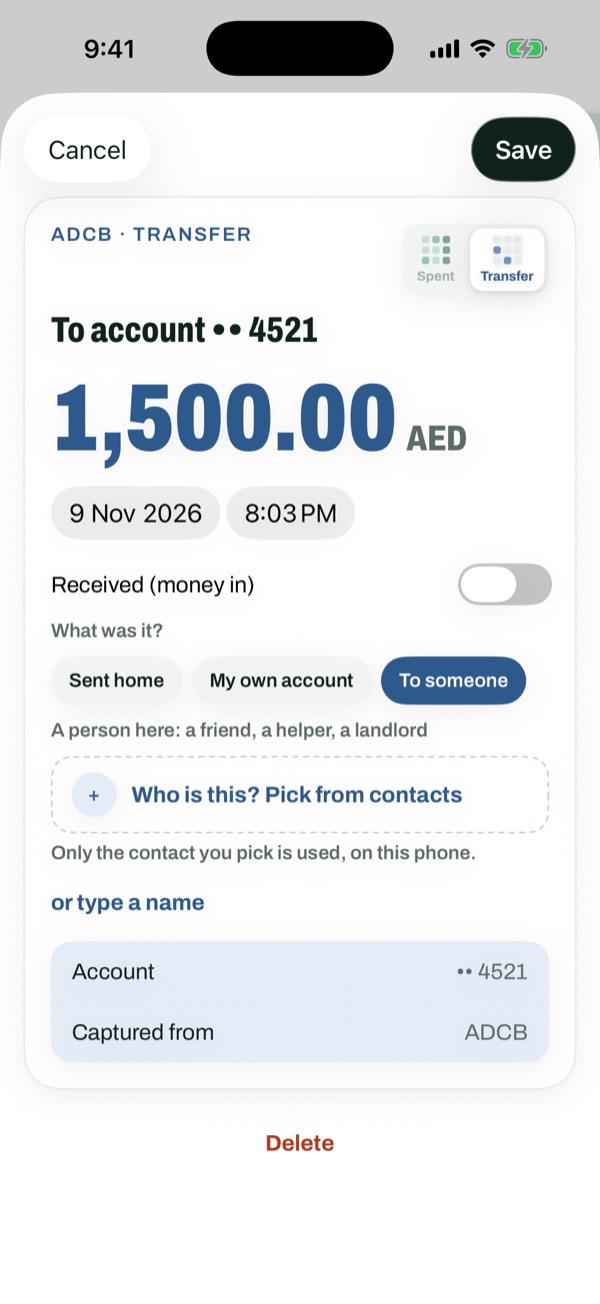
When your bank texts about money you sent, Ledger saves it as a transfer, not spending, and a notification tells you so. Tap it and pick what it was: Sent home, My own account or To someone. Pick once and the month stays honest.
Leave your own accounts out
Moving money to your own savings, here or back home, isn't money gone. Give the account a name once, like HDFC savings, and Ledger keeps those moves in Transfers with a dashed outline, left out of Sent and Net.
See every transfer at a glance
Tap Transfer beside the month to see what you sent, what you received and the net, how often, the split by kind and the biggest one.
A trip home gets its own card
Pay in rupees on a visit home and Ledger adds an India card by itself; Pakistan works the same way in PKR. Each card shows its own money, and the home card adds every country up in dirhams, showing the rate it used.
Rupee transfers, shown in dirhams
Pay family from your account back home? A transfer in rupees or another currency also shows what it comes to in dirhams, so both sides of your money read in one currency.
Know what's left after rent and bills
Tap the budget card on Month for Left over: money in, minus rent, loans and bills, minus what you spent. Transfers stay out of it, so glance at Sent next to it before you plan the rest of the month.
Set it up in 3 steps
- Install Ledger, then pick the UAE and your banks on one screen.
- Turn on capture: one Shortcuts automation on iPhone, or SMS access on Android. Ledger shows every step.
- When your first transfer comes in, tap Sent home, My own account or To someone, and name your own accounts once.
Questions
Does money I send home count as spending?
No. Transfers are saved apart from spending, and the budget card and tips only look at spending. Tap Transfer beside the month to see what you sent.
Does Ledger log in to my bank, here or at home?
No. There's no bank login anywhere. Ledger reads the texts your banks send to this phone. For an account whose texts go elsewhere, you can import its statement as a CSV or text PDF.
Who can see my transfers?
No one. No bank login, and your bank texts and spending stay on your phone. Ledger counts app opens with a random ID and has your email only if you type it.
Keep spending. Ledger remembers the rest.
Ledger is the smart saver for the UAE, Saudi Arabia, India and Pakistan, on iPhone and Android. Free. No bank login. Your bank texts and spending stay on your phone.