Why the last week is always tight
The first week after payday feels easy. Then the 20th comes and there's less than you thought, because small payments added up while nobody was looking.
Ledger fills in your spending from bank texts, so the numbers are already there. These six habits turn them into a month that lasts.
Tell Ledger your salary and payday
Add your salary and the day it's paid, plus any other money that comes in each month, like a side job. When the salary text arrives it confirms the salary instead of adding it twice. Budget and salary stay hidden behind dots on You until you tap the eye.
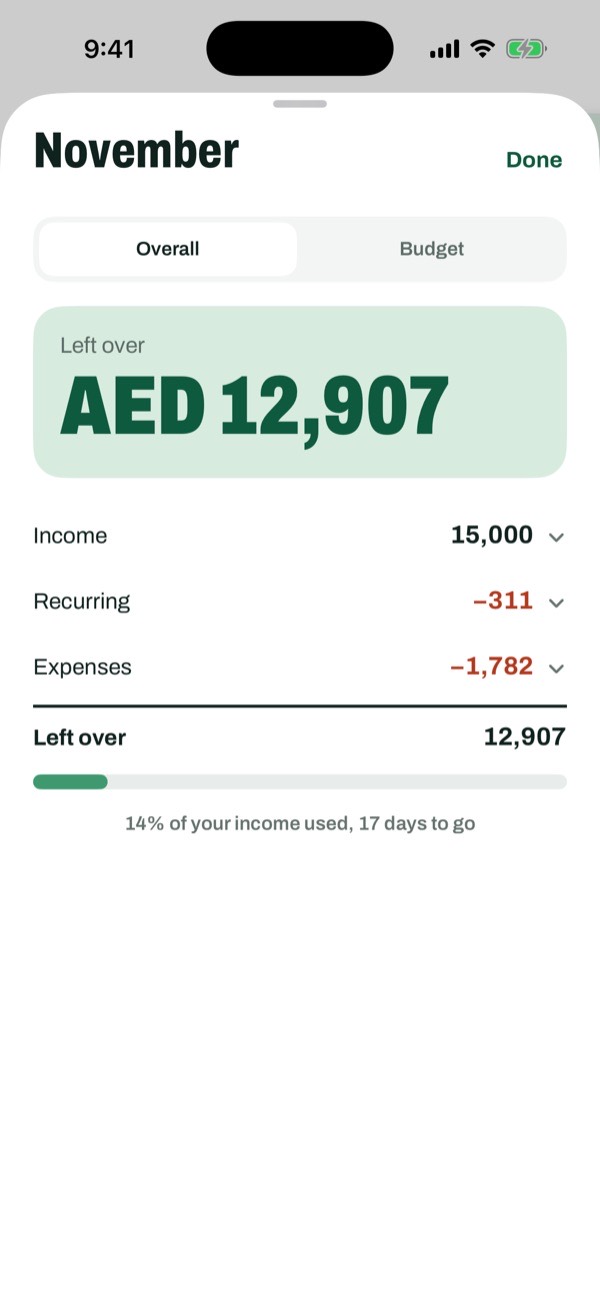
One number for what's left
Tap the budget card on Month for Left over: money in, minus rent, loans and bills, minus what you spent. Switch to Budget to see what's left of the budget instead. Tap any row to see what's in it.
Know when you're spending fast
The budget card compares what you've spent with how far through the month you are. Ahead of pace, Tally says so early, with the days left and the numbers a tap away.
Look back payday to payday
On Categories, pick Payday to payday from the quick picks. The squares, the list and Tally's line follow those dates, so you see where one salary actually went.
A goal that counts in paydays
Set a goal, like an emergency fund, and Ledger shows what each payday needs and how to catch up if one payday falls short. Goals fill from your transfers to savings.
Plug the leak with a challenge
Spend less on one category, save an amount or keep no-spend days. Pick the rule and how long, and earn a badge when you make it. Groceries, bills, health, education and rent are never suggested as cuts.
Set it up in 3 steps
- Install Ledger, pick your country and banks, and turn on capture.
- On You, add your salary and the day it's paid. Set a budget, or let Tally suggest one after a month.
- Once a week, tap the budget card on Month and check Left over.
Questions
Does my budget reset on payday?
Your budget runs by calendar month. To see one salary's stretch, pick Payday to payday on Categories; Goals count in paydays.
Does money I move count against Left over?
No. Left over counts money in, rent, loans and bills, and spending. Money you move sits under Transfer.
Can anyone see my salary?
Not unless you choose to share your month's income total with your household in Family. Otherwise it stays on your phone, and it starts hidden behind dots on You.
Keep spending. Ledger remembers the rest.
Ledger is the smart saver for the UAE, Saudi Arabia, India and Pakistan, on iPhone and Android. Free. No bank login. Your bank texts and spending stay on your phone.